





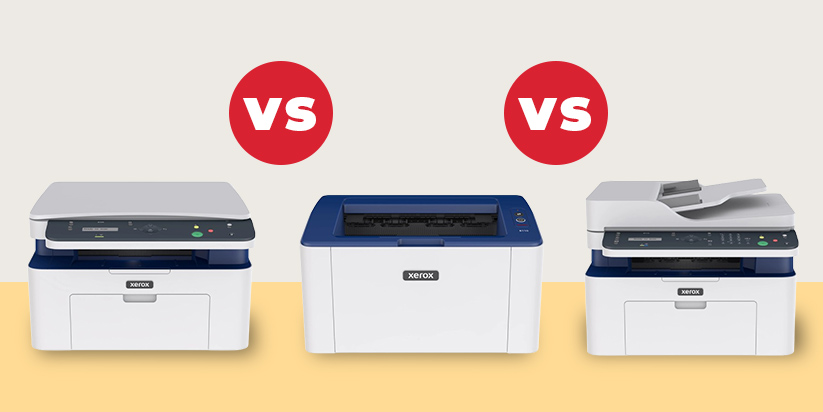
The choice between the Xerox B105, B110 and B115 depends on the functions you need. The Xerox B110 is a compact printer without copying or scanning functions. The Xerox B105 is an MFP (printer, copier and scanner) with USB and Wi-Fi connectivity. The Xerox B115 offers the most features of the three models – Ethernet connectivity, built-in fax and an automatic document feeder (ADF) for scanning and copying multi-page documents.
What are the main differences between the Xerox B105, B110 and B115?
All three models offer print speeds of up to 20 pages per minute in A4 format, a monthly duty cycle of up to 10,000 pages and a print resolution of 600×600 dpi, reaching up to 1200×1200 dpi with enhanced image quality [1].
The main differences are in their functions and connectivity options:
|
Feature |
Xerox B115 |
Xerox B105 |
Xerox B110 |
|
Device type |
MFP – printer, copier, scanner, fax |
MFP – printer, copier, scanner |
Printer only |
|
Print speed |
up to 20 ppm (A4) |
up to 20 ppm (A4) |
up to 20 ppm (A4) |
|
Monthly duty cycle |
up to 10,000 pages |
up to 10,000 pages |
up to 10,000 pages |
|
Processor and memory |
600 MHz / 128 MB |
600 MHz / 128 MB |
600 MHz / 128 MB |
|
Print resolution |
600×600 dpi (up to 1200×1200 enhanced) |
600×600 dpi (up to 1200×1200 enhanced) |
600×600 dpi (up to 1200×1200 enhanced) |
|
Connectivity |
USB 2.0, Wi-Fi, Ethernet 10/100 |
USB 2.0, Wi-Fi (no Ethernet) |
USB 2.0, Wi-Fi |
|
Automatic Document Feeder (ADF) |
Yes – up to 40 sheets |
No |
Not applicable (not an MFP) |
|
Fax |
Yes |
No |
No |
|
Weight |
8.6 kg |
7.5 kg |
4.1 kg |
|
Dimensions (H×W×D) |
406×360×309 mm |
406×360×257 mm |
331×215×188 mm |
The comparison shows that the choice between the three models depends less on their printing specifications and more on how you intend to use the device.
Who is the Xerox B110 suitable for?
The Xerox B110 is designed for users and offices that only need a printer. Its compact dimensions also make it suitable for workspaces with limited space. The model can be a good choice for:
-
home users who mainly print documents;
-
small offices that have a separate device for scanning or copying;
-
workspaces with limited space, where its dimensions of 331×215×188 mm and weight of 4.1 kg are an advantage;
-
users looking for the most affordable of the three models.
If your main requirement is everyday printing, Xerox B110 provides the necessary functions without including copying and scanning capabilities.
Who is the Xerox B105 suitable for?
The Xerox B105 is suitable if you need copying and scanning in addition to printing, but your work does not require an Ethernet connection, fax or automatic document feeding. The model is practical in the following situations:
-
Small office or home office
The Xerox B105 combines a printer, copier and scanner in a single device and allows you to work with different types of documents on a daily basis. -
Workspace with Wi-Fi or USB connectivity
The model can be used wirelessly via Wi-Fi or connected directly to a computer via USB, depending on how the workspace is organised. -
Working mainly with single pages
The B105 is suitable if you scan and copy individual documents and rarely need to process a large number of pages at once.
In these scenarios, Xerox B105 offers a balanced solution between price and functionality.
Who is the Xerox B115 suitable for?
The Xerox B115 is designed for working environments where multi-page documents are regularly copied and scanned or where a wired network connection is required. Compared with the other two models, it offers additional features:
-
Ethernet port for connection to a local wired network;
-
ADF with a capacity of up to 40 sheets for automatic feeding when scanning and copying;
-
built-in fax;
-
Earth Smart driver for settings related to more economical use of resources [1].
These features make Xerox B115 suitable for offices where multi-page documents are regularly processed and Ethernet connectivity, automatic document feeding or fax functionality is required.
When choosing office equipment, more features do not always mean a better solution. It is more practical to choose a model whose capabilities match the way you actually work, allowing you to make full use of the device without paying for features you do not need. If you would like to compare other options, you can browse our Xerox Printers category.
Sources
[1] Xerox Corporation, „Xerox® B115/B105 Multifunction Printer and Xerox® B110 Printer". https://gzhls.at/blob/ldb/d/4/a/c/68ff03956510a9a4dc91b9ca15d80f73c036.pdf